Created by Calle Ekdahl.
GPL-2.0+ licensed.
Current version: 1.0
jsoup is an open-source library written in Java, which excels at parsing HTML and manipulating the DOM. jsoupLink is a package written for Mathematica in Wolfram Language which aims to provide an interface to jsoup that feels natural for Mathematica users.
While traditionally HTML has been worked on in Mathematica by importing it as symbolic XML and painstakingly transforming it with pattern matching, jsoupLink introduces the concept of HTML element objects, which make it super easy to traverse the DOM tree and to modify it.
The most common application for jsoupLink is to extract information from websites, for example table data.
jsoupLink is distributed in the form of a paclet. Download the latest version of the paclet from the releases page and install it using the the PacletManager package (which you already have because it comes with Mathematica):
Needs["PacletManager`"]
PacletInstall["~/Downloads/jSoupLink-1.0.0.paclet"]
Use Needs to load jsoupLink:
Needs["jsoupLink`"]
It is easy to import and export HTML using jsoupLink, with the built-in Import and Export commands. Specify HTMLDOM as the file format.

The returned value is an HTML element object. It has properties that can be used to access information about itself or its children. It also has properties that can modify itself or its children. Having modified the object, exporting it back to HTML is equally simple:

HTML is but a bunch of nested elements. <div><p>Paragraph 1</p><p>Paragraph 2</p></div> is made up of a div element and two p elements, the div being the parent to its two children p, and the ps being siblings. The idea of jsoup is to assign one object to each element, and to relate the objects to each other through properties. The property Children of the object corresponding to div would list the two objects corresponding to the p elements, the property Parent on either of the p elements would list the object div, and the Siblings property of either of the p elements would list the other p element. Furthermore other properties would retrieve other types of information. The InnerHTML property of div would return <p>Paragraph 1</p><p>Paragraph 2</p> as a string, whereas the OuterHTML property of the first p would return <p>Paragraph 1</p>.
jsoupLink provides direct access to all of these objects and their properties. In a notebook, these objects have a distinctive display:

Starting with the object corresponding to the outermost element, html, various properties can be used to find all other elements of interest. Properties can be retrieved as subvalues of the objects, as in the image.
In difference to normal Wolfram Language expressions, objects representing elements are mutable, and there are several properties that can modify elements. Most properties can be accessed as obj["property"], some take several arguments, e.g. obj["Attribute", "attributeName"], or obj["Attribute", "key", "value"], which will set the attribute key to the value value. Since setting attributes is a common task, the shorthand notation obj[key] = val is also provided. Attributes can also be retrieved with obj[attr] if attr is not one of the properties listed by obj["Properties"].
Throughout this list, objects representing HTML elements will be referred to simply as elements. Elements are arranged in a tree structure, called the DOM tree. Whenever descriptions such as "the same level" or "topmost", or "beneath" are used in the following text, it refers to this tree structure. (See also the first paragraph of the preceding section.)
This is a complete listing of all the properties, available to all elements:
-
element["TagName"]Tag name. Example: link elements returna, paragraph elements returnp. -
element["TagName", "tag"]Set element tag name. Example: Use to convert anh1element into anh2element. -
element["Root"]Topmost element, usuallyhtml. -
element["Parent"]Immediate ancestor ofelement. Example: the parent tobodyishtml. -
element["Children"]All elements that lie directly underelement. Example:lielements are usually children of aul. -
element["Siblings"]All elements on the same level aselement. Example: The siblings of an<li>elements are usually other<li>elements. -
element["Select", "selector"]All elements from anywhere beneathelement, that match the CSS selector "selector". More information about valid syntax: Use selector syntax to find elements. -
element["AllElements"]All elements beneathelement. -
element["InnerHTML"]HTML corresponding to the offspring ofelement. Example: the inner HTML of<div><b>Great!</b></div>is<b>Great</b>. -
element["OuterHTML"]HTML corresponding toelementand all offspring. Example: the outer HTML of<div><b>Great!</b></div>is<div><b>Great!</b></div>. -
element["OwnText"]Text which resides directly underelement. Example: theOwnTextof<p>text <b>more text</b></p>istext. TheOwnTextof thebelement ismore text. -
element["AllText"]All text beneathelement. Example:AllTextof thehtmlelement returns all text in the document. -
element["AllText", "text"]Remove existing elements and text beneathelementand replace with"text". -
element["ID"]TheIDattribute. -
element["ClassNames"]List of classes in the class attribute. -
element["Value"]Thevalueattribute, if the element has it. -
element["HasAttribute", "attr"]Trueif the attributeattris given, andFalseotherwise. -
element["Attribute", "attr"]Value of the attributeattr. -
element["Attribute", "attr", "val"]Set attributeattrto the valueval. -
element["Attribute", "attr", True | False]Set attributeattrto""ifTrue, removeattrifFalse. -
element["Attribute", "assoc"]Set all attributes as given by the associationassoc. -
element["Attributes"]Association with all attributes and their values. -
element["RemoveAttribute", "attr"]Remove the attributeattr. -
element["IsBlock"]Trueifelementis a block level element,Falseotherwise. -
element["HasText"]Trueifelement["AllText"]is not equal to"",Falseif it is. -
element["BaseURI"]The base URI of the document. -
element["BaseURI", "uri"]Set the base URI of the document. -
element["HasClass", "class"]Trueifclassappears inelement's class attribute,Falseotherwise. -
element["AddClass", "class"]Addclasstoelement's class attribute. -
element["RemoveClass", "class"]Removeclassfromelement's class attribute. -
element["ToggleClass", "class"]Addclasstoelement's class attribute if it doesn't have it, and remove it if it is already there. -
element["Before", "html"]Parsehtmland insert the resulting object beforeelement. -
element["Before", el]Insert elementelbeforeelement. -
element["After", "html"]Parsehtmland insert the resulting object afterelement. -
element["After", el]Insert elementelafterelement. -
element["Prepend", "html"]Parsehtmland prepend the resulting object toelement's children. -
element["Prepend", el]Prepend elementeltoelement's children. -
element["Append", "html"]Parsehtmland append the resulting object toelement's children. -
element["Append", el]Append elementeltoelement's children. -
element["ReplaceWith", el]Replaceelementwith elementel. -
element["Remove"]Removeelement. -
element["Wrap", "html"]Makeelementa child of the object resulting from parsinghtml. -
element["Unwrap"]Removeelementbut keep its children, essentially moving them up one level. -
element["Clean"]Runelementand all its offspring through a whitelist. Used to e.g. prevent XSS attacks. -
element["DeepCopy"]Return a copy ofelement, such that modifications done to the copy do not affectelement. -
element["Properties"]List all properties. -
element["DOMTree"]Display the DOM tree. Details below.
element["DOMTree"] opens an interface to view the DOM tree with element as root:
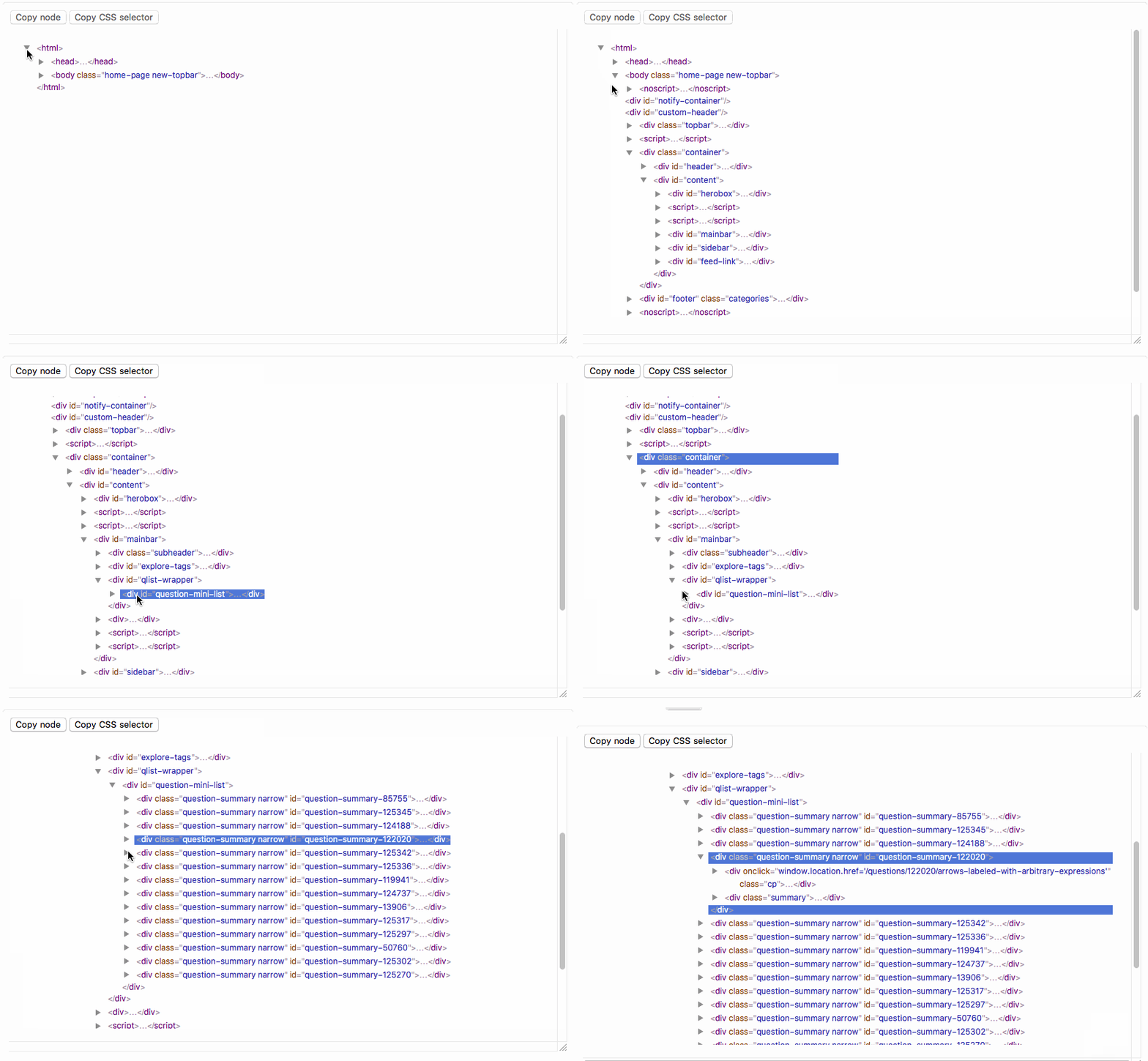
Elements can be selected by clicking on them. The "copy node" button writes the corresponding element to the clipboard, so that it can be pasted into a notebook. "Copy CSS selector" writes a CSS selector that uniquely identifies the selected element to the clipboard.
If you are having problem retrieving absolute URLs from links, you may try to retrieve the abs:href attribute instead of the href attribute.