Everyone is invited to improve the documentation! :-)
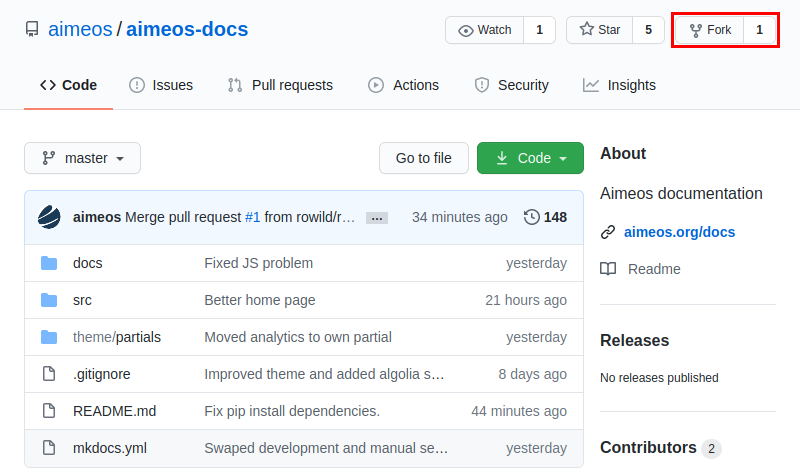
Just fork the repository, edit and add files, commit your changes and create a pull request:
Read on, if you want to know, how to edit the documentation locally using Git and preview your changes on your local machine.
-
Create a free github account, if you do not already have one
-
Go to
https://github.com/aimeos/aimeos-docsand fork the repo (click on the "Fork" button on the top right, see image above) -
In your terminal, clone the forked repo to a destination of your choice with:
> git clone https://github.com/[YOUR-GITHUB-ACCOUNT]/aimeos-docs.gitThis creates a folder called aimeos-docs.
-
Change into your newly created local aimeos-docs folder and add upstream links to be able to always keep your local clone up-to-date:
> cd aimeos-doc
> git remote add upstream git://github.com/aimeos/aimeos-docs.git
You can verify your git configuration using
git remote -v:> git remote -v origin https://github.com/<YOUR_GITHUB_REPO>/aimeos-docs.git (fetch) origin https://github.com/<YOUR_GITHUB_REPO>/aimeos-docs.git (push) upstream git://github.com/aimeos/aimeos-docs.git (fetch) upstream git://github.com/aimeos/aimeos-docs.git (push)
Keep your local clone and your fork up-to-date with:
> git fetch upstream
> git merge upstream/master master
> git push
Optional:
> git rebase upstream/master -
For each change you would like to commit, create and checkout a new branch, e.g.:
> git checkout -b <name-of-your-current-commit-branch>
-
Edit the mardown files you wish to contribute to, add a comment and push them to your fork:
> git add <the-file-you-just-edited>.md
> git commit -m '<describe briefly, what you changed>'
> git push -u origin <name-of-your-current-commit-branch>
-
Go to your aimeos-docs fork in your github account and create a pull request.
-
Once your are finished with your commit, don't forget to switch back to the master branch in your local clone:
> git checkout master -
Once your commit is merged, you can delete your local and remote branches again with:
> git branch --delete <branch_name>
> git push origin --delete <branch_name>
Then update your local clone and your github fork again with:
> git fetch upstream
> git merge upstream/master master
> git push
Contributing to aimeos-docs does not require anything else but editing the markdown files. However, if you would like to run a local version of the generated docs, you need Python 3. This enables the local generation of the complete aimeos-docs as well as running a local development server that reloads automatically as soon as changes to the repository files are detected.
Please refer to sources on the internet for explanations on how to install Python 3 on your operating system. One such resource would be Real Python: Installing Python.
aimeos-docs uses mkdocs to create static html files from
markdown files. Install mkdocs and the dependencies required by aimeos-docs with pip:
pip install mkdocs mkdocs-material
pip install plugins/Run mkdocs serve to start a local server on http://127.0.0.1:8000. Now, whenever you make
changes to any file, the server will automatically reload and display your edited version.
To build the aimeos-docs locally, use mkdocs build. You can now open the documentation
in your browser from the newly generated <your-aimeos-docs-clone-folder>/docs´s index.html.
Due to some configuration limits, mkdocs serve will tell you that it couldn't find versions.js.
Also, mkdocs serve as well as mkdocs build might warn about an unknown analytics configuration
attribute. You can safely ignore these warnings.