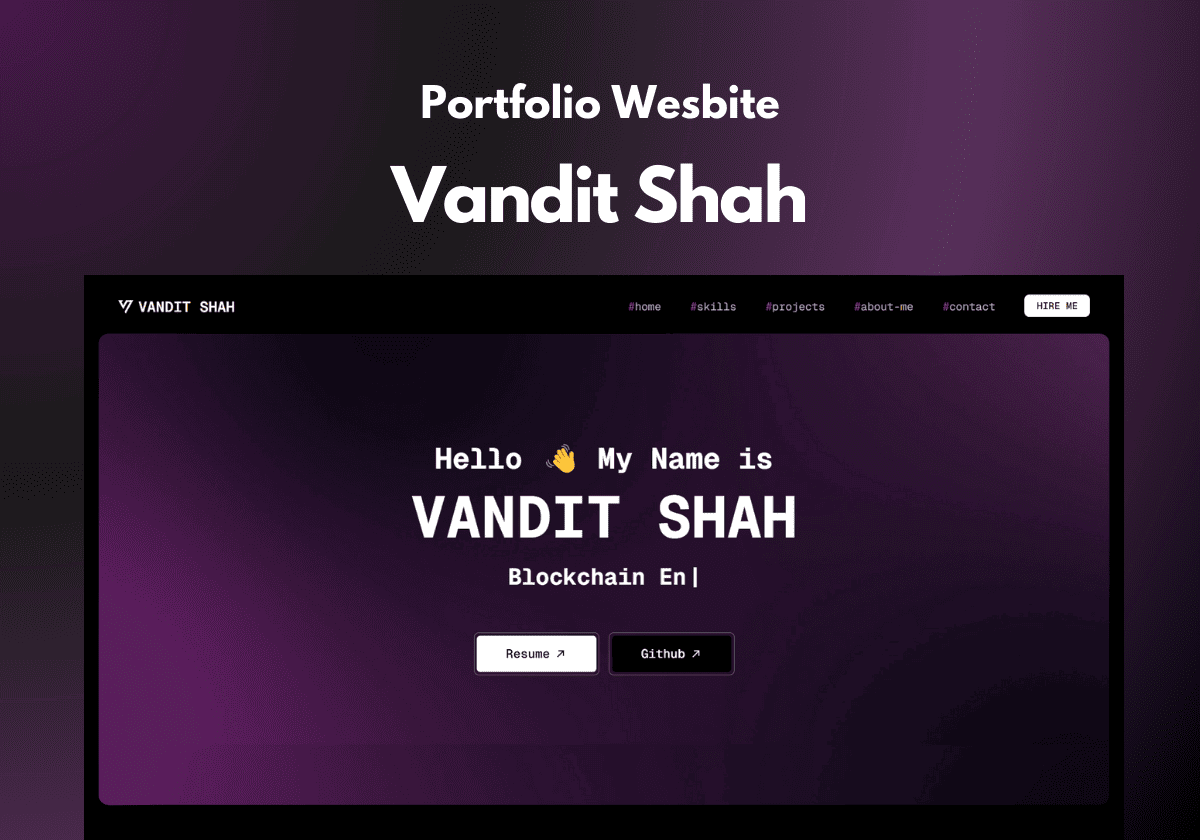
A modern, single-page portfolio website built with Next.js and Tailwind CSS, showcasing my skills, projects, and journey as a full-stack web developer. This project is designed to be easily customizable via a data.json file, allowing anyone to adapt it for their own portfolio by simply updating the data.
- Single-Page Design: A sleek, scrollable layout with sections for Home, Skills, Projects, About Me, and Contact.
- Dedicated Projects Page: A /projects route to display all projects, categorized by tech stack (e.g., Full Stack, React, Next.js, Blockchain) with a filtering feature.
- Modern Techy Theme: Dark background with purple accents, monospaced fonts, and gradient borders for a developer-centric aesthetic.
- SEO Optimized: Includes meta tags, schema markup, and a sitemap for better search engine ranking (e.g., optimized for "Vandit Shah").
- Responsive Design: Fully responsive across devices using Tailwind CSS, ensuring a great experience on mobile, tablet, and desktop.
- Interactive Elements:
- Navbar with active link highlighting based on scroll position.
- Category filtering on the Projects page with a fade-in animation for project cards.
- Video background in the hero section with an image fallback for unsupported devices.
- Customizable Data: All content (navbar text, projects, skills, etc.) is abstracted into a data.json file for easy customization.
- Performance Optimized:
- Server-side rendering (SSR) for most components to reduce client-side JavaScript.
- Next.js Image component for optimized image loading.
- Compressed video and image assets for faster load times.
- Accessibility: Includes ARIA attributes for the mobile menu and semantic HTML for better screen reader support.
- Framework: Next.js (App Router)
- Styling: Tailwind CSS
- Fonts: Google Fonts (Geist Mono)
- Assets: Video background, project images, tech stack icons
- Deployment: Deployable on Vercel or any Node.js hosting platform
- Other Tools:
- FFmpeg for video compression
- IntersectionObserver API for active link highlighting
- JSON for data abstraction
-
Clone the Repository:
git clone https://github.com/ShahVandit8/portfolio-v2.git cd portfolio -
Install Dependencies:
npm install # or yarn install -
Customize data.json:
- Open data/data.json and update the fields with your information:
{ "data": { "navtext": "Your Name", "email": "your.email@example.com", "projects": [ { "projectType": "Project Type", "title": "Project Title", "description": "Project description.", "techStack": ["tech1", "tech2"], "image": "/images/project-image.png", "liveLink": "https://project-live-link.com", "githubLink": "https://github.com/your-username/project", "category": "Category (e.g., Full Stack, React)" } ] } }
- Add your projects, skills, and other details as needed.
-
Add Assets:
-
Place your profile picture, project images, and tech stack icons in the public/images/ and public/icons/ directories.
-
Replace public/background/bgvideo.mp4 with your hero section video (or keep the existing one).
-
Compress the video using FFmpeg for better performance:
ffmpeg -i your-video.mp4 -c:v libx264 -preset veryslow -crf 18 -vf scale=1280:720 -an -pix_fmt yuv420p public/background/bgvideo.mp4 -
Add a fallback image (public/poster-bgvideo3.jpg) for the video.
-
-
Run the Development Server:
npm run dev # or yarn devOpen http://localhost:3000 to view the site.
-
Build and Deploy:
-
Build the project:
npm run build # or yarn build -
Deploy to Vercel or your preferred hosting platform:
vercel deploy
-
- Data Customization:
- Edit data/data.json to update your name, email, projects, and other content.
- Add more projects by following the existing structure in the projects array.
- Styling:
- Modify app/globals.css to adjust colors, fonts, or animations.
- Update Tailwind CSS classes in components to change the layout or design.
- Video Background:
- Replace public/bgvideo.mp4 with your own video.
- Ensure the video is compressed and has a fallback image for unsupported devices.
- SEO:
- Update the metadata object in app/layout.js with your site's title, description, and Open Graph images.
- Customize the public/sitemap.xml and public/robots.txt for your domain.
- Navbar: Highlights the active section as you scroll (e.g., #projects turns white when viewing the Projects section).
- Hero Section: Features a video background with a fallback image, a typewriter effect for titles, and SEO-optimized
- Projects Page: Displays all projects at / 6880 projects, with category filtering (e.g., Full Stack, React) and a fade-in animation for project cards.
- SEO Optimization: Includes meta tags, schema markup, and a sitemap to rank for your name (e.g., "Vandit Shah").
- Performance: Uses server-side rendering for most components, with client-side interactivity isolated to specific features (e.g., filtering, scroll effects).

Contributions are welcome! If you'd like to improve this project, please follow these steps:
- Fork the repository.
- Create a new branch (git checkout -b feature/your-feature).
- Make your changes and commit (git commit -m "Add your feature").
- Push to your branch (git push origin feature/your-feature).
- Open a Pull Request.
- Name: Vandit Shah
- Email: shahvandit8@gmail.com
- GitHub: github.com/ShahVandit8
- Portfolio: vandit-shah.me