Slack Platform
The platform agents and AI call home.
The Slack platform brings your entire tech stack together. It’s scalable, secure, and purpose-built for adding agents and AI to every business.
The Slack platform brings your entire tech stack together. It’s scalable, secure, and purpose-built for adding agents and AI to every business.
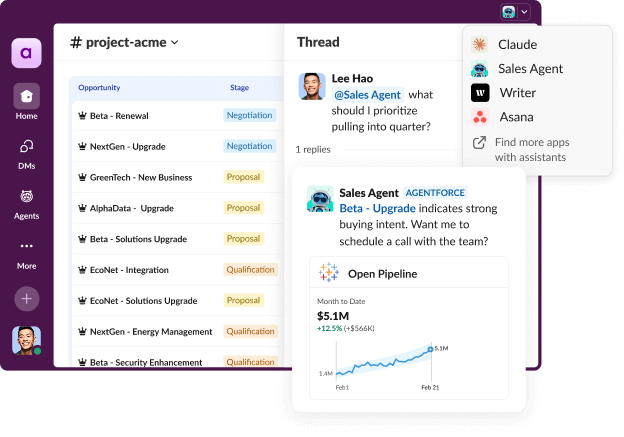
The Slackbot MCP client makes it possible to integrate any app or agent directly into Slackbot, turning Slack into the front door for your tech stack. Instead of navigating multiple dashboards to qualify leads or track vendors, Slackbot can route requests to specialized agents and deliver results right back into your flow.
In Slack, you can connect over 2,600 apps, bring real-time data into your conversations, and give AI agents the context they need to jump in and help. When it's time to tackle a project, code channels give teams and agents a place to build together.
Working without contextual data is like working with one hand tied behind your back. The Real-Time Search API and our Slack-authorized Model Context Protocol server give you access to rich conversational data in Slack, so you can build AI apps and agents with more intelligent responses, all while keeping your data secure.
Slack makes it easy for anyone to automate tasks, by click or by code. With AI-powered workflows, you can trigger agent responses, update records, and more. And if you happen to be a developer, you can fully customize everything from backend services to modular components that plug directly into Slack.
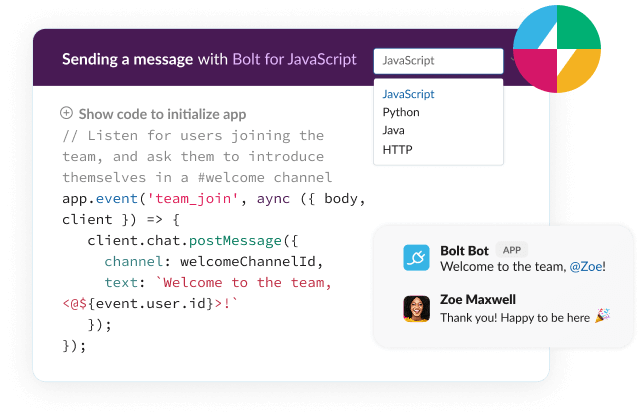
The Slack platform simplifies the development process with a comprehensive developer toolkit, including Slack CLI for lifecycle management and Bolt for application development. Build dynamic app and agent experiences with block kit and work objects while developers run backend services, connect via Heroku, or build modular components.
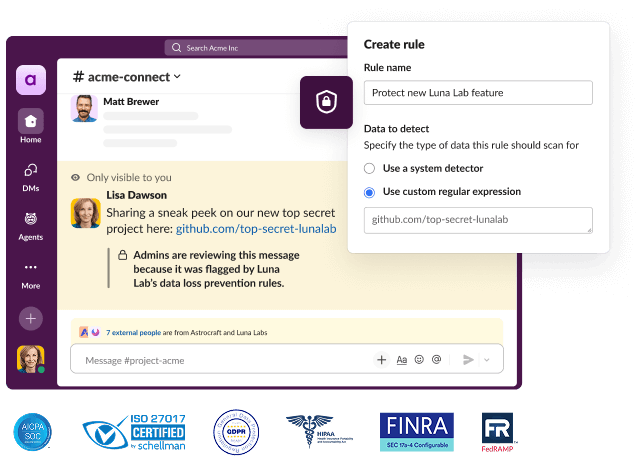
Enterprise-grade security comes standard in Slack, including robust governance, risk management, and compliance features to protect your business. With strict admin controls like single sign-on, enterprise mobility management, and data loss prevention, we’ll make sure your data stays private.
“We’re pleased to bring ChatGPT even closer to where work happens in Slack—so teams can tap into frontier AI as naturally as talking to a teammate. With the ChatGPT app for Slack integrated into conversations, files, and workflows, knowledge and insights are always at your fingertips, making it easier to move work forward together.”
“Perplexity is redefining search as a conversational, transparent discovery experience. By connecting to Slack through the MCP server, we can now ground queries in the context of team conversations—helping users surface answers that are not only accurate, but directly relevant to their work. Slack has been a fantastic partner in making this possible, with shared focus on security, compliance, and user trust.”
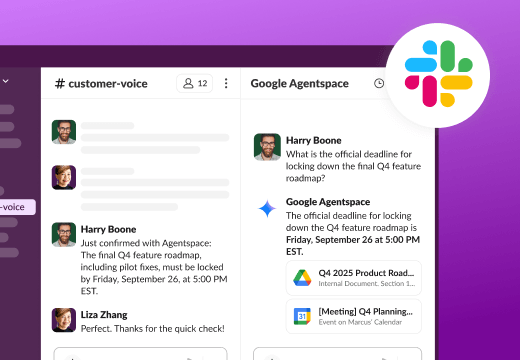
“Organizations depend on Google Agentspace and Slack for productivity and collaboration. Now, customers can embed insights from Agentspace directly into Slack and use Slack conversations to enhance workflows within Agentspace, creating a more seamless flow of information that enhances everyday work.”
"Businesses today conduct their most important conversations across multiple Slack channels, creating a wealth of institutional knowledge that hasn't been accessible to AI assistants. Slack's Real-Time Search API changes that — Claude can now draw context from actual discussions to provide answers grounded in your real work, then deliver those insights directly back into your workflow. This integration enables Claude to provide trusted intelligence that's aligned with how teams actually operate."
Excellent question. Slack is a new way for your entire company to work. Instead of email, Slack is a faster, better organized and more secure platform – all your communication is organized into channels that are easy to create, join and search. When there’s a channel for everything going on at your company, everyone knows exactly where to go to get work done. Slack also brings AI to the flow of work, helping you throughout your workday, making it faster and easier to find and act on the information you need. And, unlike email, Slack integrates with all the other systems in your tech stack to become the single OS for all your work. Slack puts everything and everyone you need to get work done in one single place, so no more context switching, data silos, or lost intel.
For more reading on the topic, we recommend checking out our Resources Library.
Slack enables all your tools to work better by letting you integrate software and custom apps right into Slack. Here are some popular categories and examples:
Project management: Connect Slack with project management tools such as Asana, Miro, Notion, and Jira to update tasks, track progress, and manage projects without leaving Slack.
Customer support: Integrate customer support apps like Salesforce Service Cloud, Zendesk, and Freshdesk to manage tickets and communicate with customers directly through Slack.
CRM systems: Link Slack with CRM platforms such as Salesforce Sales Cloud, HubSpot, and ZoomInfo to access customer data and receive updates on leads and deals in your Slack channels.
File management: Enhance Slack with file management systems like Box, Google Drive, and Dropbox for easy access and sharing of files.
Developer tools: Connect developer tools like GitHub, GitLab, PagerDuty, and AWS Chatbot to collaborate on code, review pull requests, and track issues directly from Slack.
These integrations help make Slack a central hub for collaboration, communication, and productivity by connecting it with the tools teams use every day.
An AI agent is an intelligent system that can handle customer questions all on its own, no humans needed. It uses machine learning and natural language processing to tackle everything from easy questions to tricky problems, and it can even juggle multiple tasks at once. AI agents can learn and get better over time, which is different from traditional AI that needs humans to step in for certain tasks. AI agents can take action on behalf of employees.
There are three types of agents and assistants that you can use in Slack:
1. Agentforce: Powered by the most relevant conversational data in Slack and your trusted enterprise data, Agentforce suggests and automates actions on your behalf. Build custom agents that bring AI-powered productivity to employees right in the flow of work. From human resources to IT, services and sales, and beyond, Agentforce can take actions in Slack like creating and updating channels, lists, and canvases. Agentforce in Slack will be available soon; talk to sales to learn more.
2. Your custom-built AI Assistants brought to the Slack platform: Right from a dedicated UI in Slack, you can embed AI Assistants that you build using purpose-built APIs. You can build these custom AI Assistants to work the same way you do, so you can offload tasks — from tickets to requests and more — and focus on the important work that needs to get done. These APIs are available today in the Slack Developer Center.
3. Third-party AI Assistants: Talk to third-party AI Assistants to get help with drafting content, surfacing market research, or retrieving and summarizing files. Today we have several out-of-the-box AI apps ready to use and download from the Slack Marketplace, such as Asana, Box, Highspot, Cursor, Adobe Express and Cohere.
Access to the RTS API and MCP is currently limited to a select group of partners. If you’re interested in exploring these capabilities and building innovative solutions for Slack customers, please fill out this form.
Slack keeps your data safe with strong security built in. Everything you send — like messages and files — is encrypted, so only the right people can see it. Your company can even control its own encryption keys for extra protection.
When you use AI or connect other apps to Slack, your data stays private and secure. Slack never shares your data with AI models for training. AI only works with the messages you already have access to, and it all runs safely within Slack’s systems.
So whether you’re using Slack’s AI features or building your own tools, you can always securely access your data.
Easily automate routine actions and communication by using Workflow Builder to create your own custom workflows.
To access Workflow Builder, head to the main menu in Slack (by clicking on your workspace name at the top left) and navigate to “Tools” > “Workflow Builder”. From there you can create a custom workflow or choose from available pre-built templates. For help creating your own workflow, check out our step-by-step guide.
Get started building workflows right away with preconfigured templates. From kicking off projects in Asana to entering data in Google Sheets to quickly onboarding new team members with the right resources from Box — the possibilities are endless.
Note: Workflow Builder is only available on Slack’s paid plans.
Excellent question. Slack is a new way for your entire company to work. Instead of email, Slack is a faster, better organized and more secure platform – all your communication is organized into channels that are easy to create, join and search. When there’s a channel for everything going on at your company, everyone knows exactly where to go to get work done. Slack also brings AI to the flow of work, helping you throughout your workday, making it faster and easier to find and act on the information you need. And, unlike email, Slack integrates with all the other systems in your tech stack to become the single OS for all your work. Slack puts everything and everyone you need to get work done in one single place, so no more context switching, data silos, or lost intel.
For more reading on the topic, we recommend checking out our Resources Library.
A session channel is a channel that’s purpose-built for humans and agents to work together on a shared piece of work. The agent spins up the channel, works there, and surfaces the output back in the context of the main channel. Once the work is complete, the channel archives, but the conversation, artifacts, and context stay searchable for anyone who needs them.