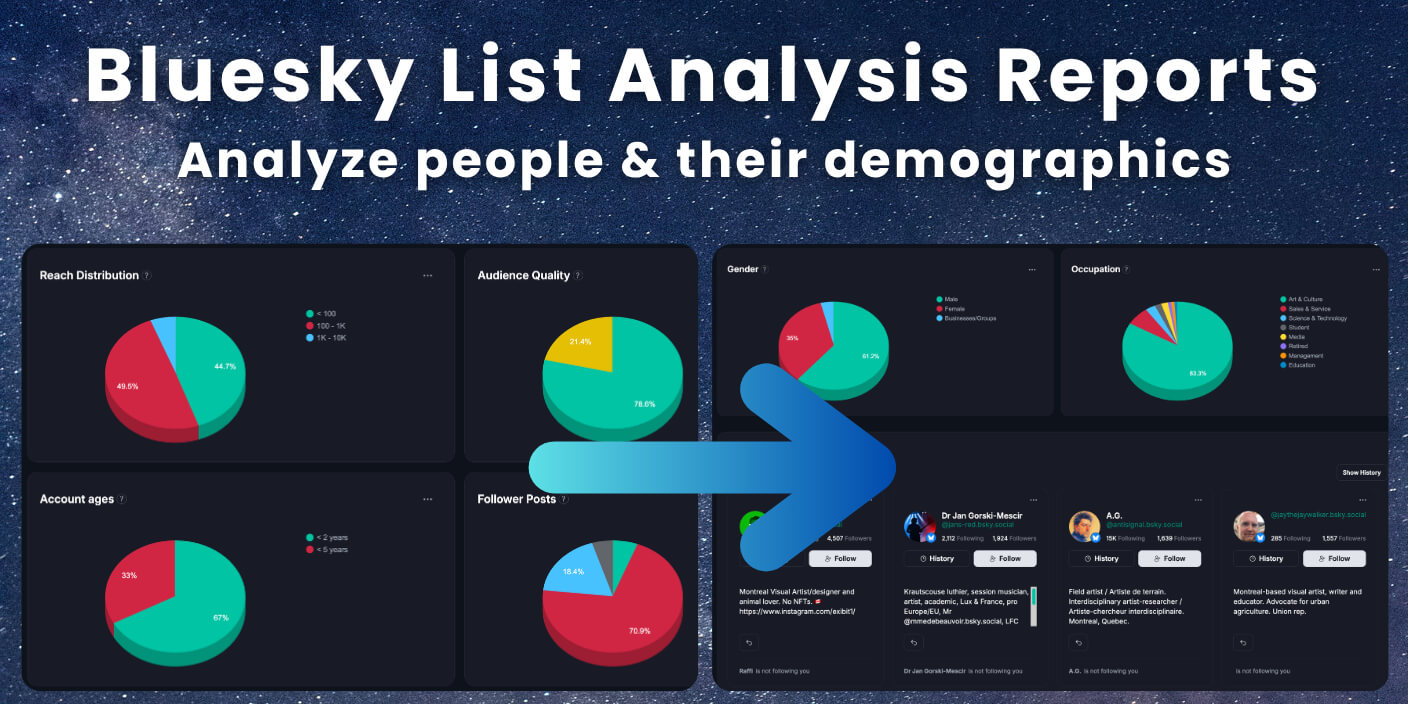
Analyze bluesky lists with Fedica. Turn list membership into an analytics report you can use. You’ll see what’s active, what’s low-signal, and which topics inside get attention. That helps you curate faster and follow with confidence.
This guide shows what a Bluesky list is. It also covers what the Fedica report includes. You’ll follow a step-by-step workflow to run the analysis. In my experience, list-level insights make feed decisions faster. Research also shows data-driven leaders are more likely to see real business impact. For example, they’re about 3x more likely to report analytics contributed 20% to earnings.
Key Takeaways
- When you analyze bluesky lists, you stop guessing which lists are actually delivering high-signal accounts.
- Fedica turns list membership into an analytics report so you can spot activity, engagement patterns, and topic fit.
- Use the results to refresh your follows and curate better lists (instead of just browsing names).
- Export or save insights so you can repeat the process when you build new lists.
When you need to find better accounts quickly, pair list analytics with Bluesky advanced search.
Table of Contents
- How to analyze bluesky lists in Fedica (step-by-step)
- Why analyze bluesky lists (so your feed stays high-signal)
- What a Bluesky list is, and what list analytics reveals
- What you get when you analyze bluesky lists in Fedica
- What to look for when analyzing Bluesky lists (quality, activity, fit)
- Turn bluesky list insights into better follows and curated lists
How to analyze bluesky lists in Fedica (step-by-step)
To analyze bluesky lists in Fedica, follow a simple workflow. First, pick the Bluesky account you want to analyze. Next, paste the list URL or identifier and run the scan. When the results load, review the overview and click the segments that match your goal. Then act: follow higher-signal accounts, refresh your list, or export the results.
Step 1: open List Analysis Tool and pick your Bluesky account
Open Fedica’s List Analytics and select the Bluesky account you want to analyze. Then paste the Bluesky list URL (or identifier) you want to evaluate.
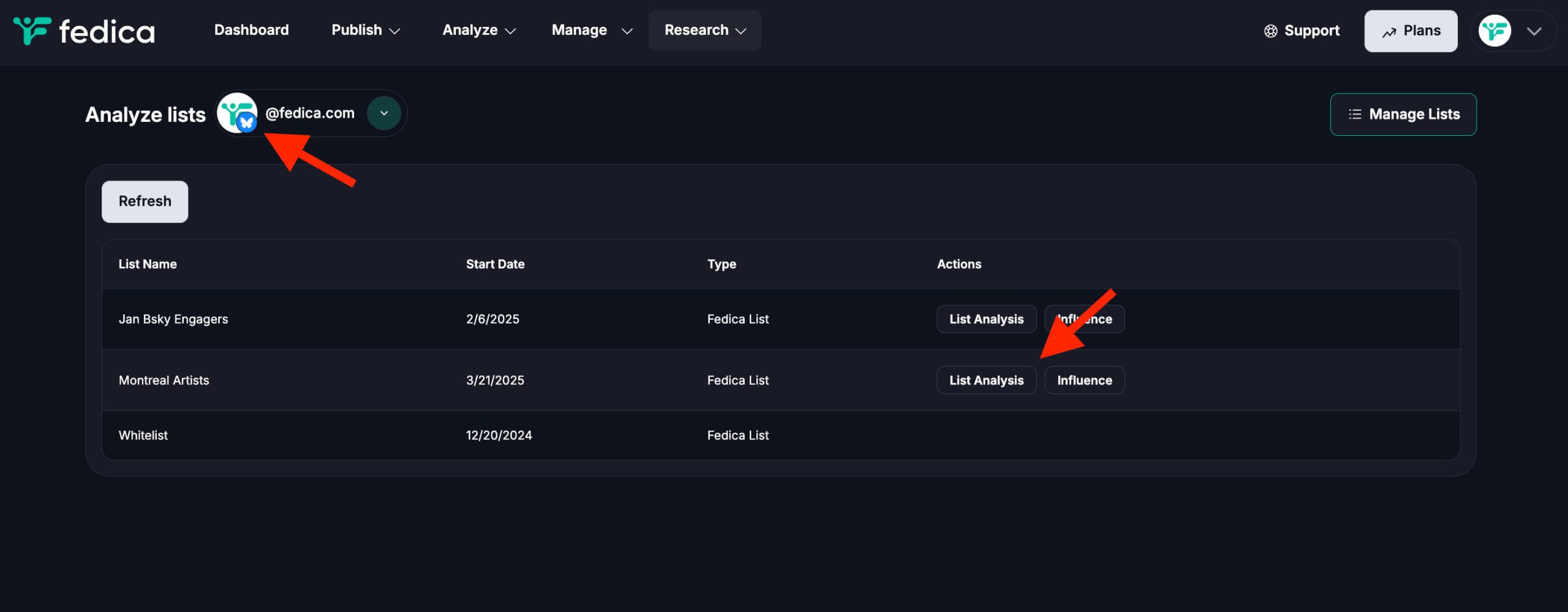
Step 2: click Analyze list to generate the report
Click Analyze list to generate the full report. You’ll then see the list’s demographics and stats, along with a complete view of every account included in that Bluesky list.
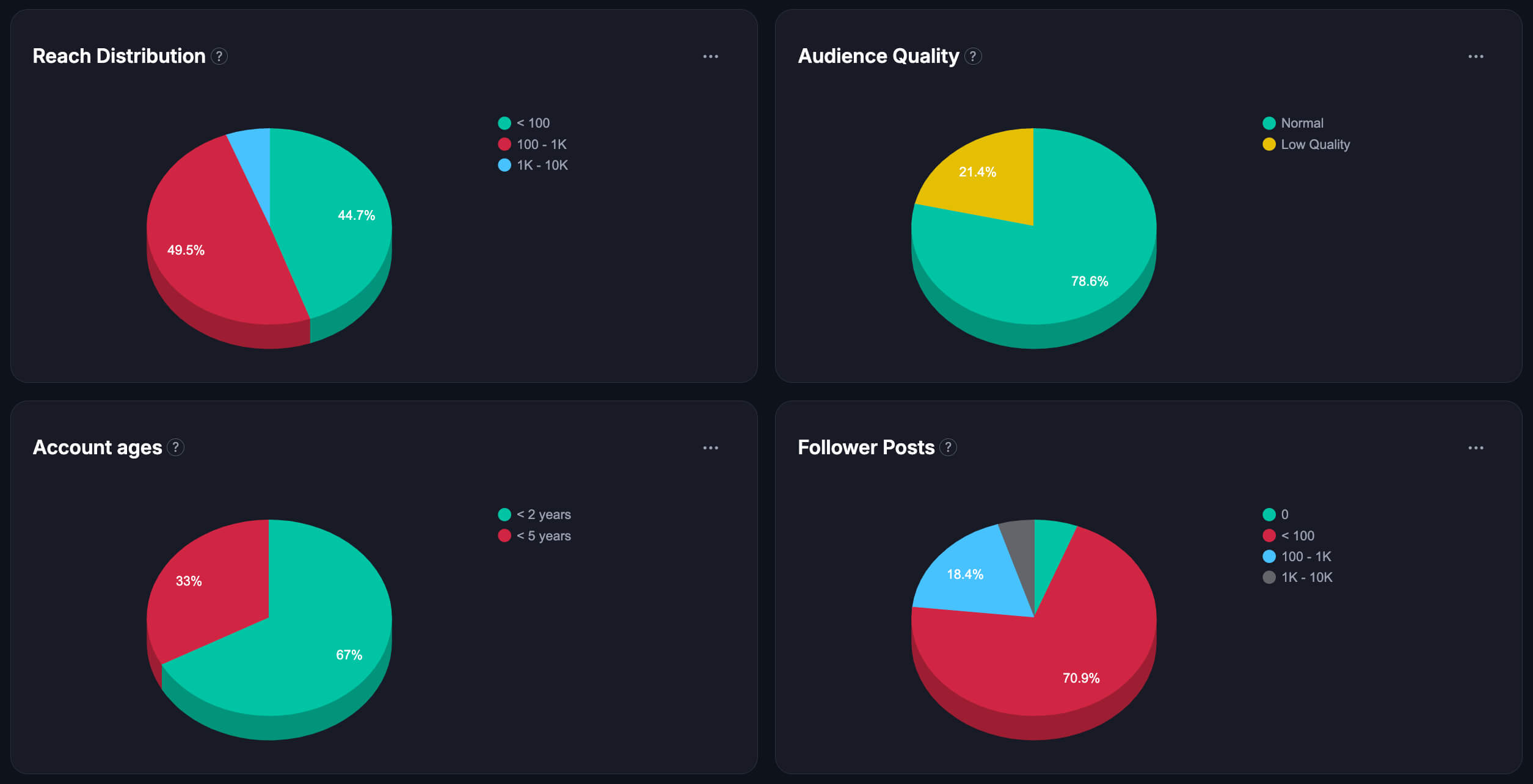
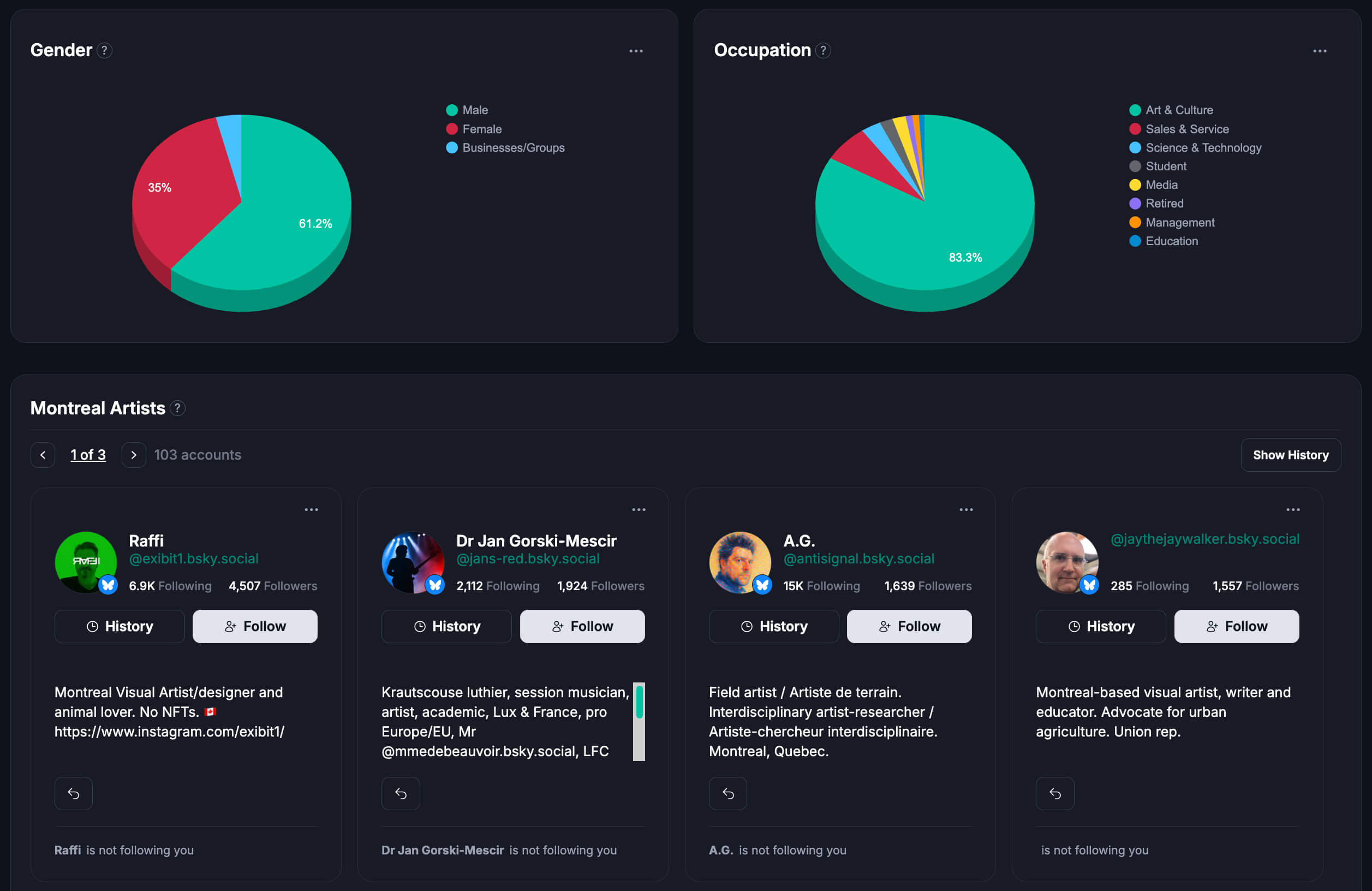
Step 3: review the demographics/stats and the full people list
Use the report to understand how the list performs across the key metrics you care about, then reference the full list of accounts when you’re deciding who to follow, engage with, or remove from your own follow workflow.
Step 4: use the list results inside other Fedica tools
After you analyze the list, carry that same reference into related tools. For example, use the Sort Followers workflow to see which people inside the list follow you (and which don’t). You can also search for accounts on Bluesky and sort your own following based on whether they’re in or out of the lists you’re analyzing, so your outreach stays targeted.
Why analyze bluesky lists (so your feed stays high-signal)
When you analyze bluesky lists, you stop trusting the first scroll. A list can look good and still drift into low-signal accounts. Fedica turns list membership into an analytics report you can act on. You’ll see what’s active and what’s not pulling its weight. Then refresh follows and tweak lists for a better feed.
Lists are built for a niche, a theme, or a community you want to keep up with. When the list is working, it helps you discover posts you care about without randomly searching all day.
You can tell signal vs dead lists when analyzing bluesky lists
Not every list stays healthy. People stop posting, drift into different topics, or the list becomes a mix of active and inactive accounts. With list analytics, you can spot which lists still deliver real discovery and which ones need a refresh.
Engagement patterns beat wild guesses in your bluesky list analysis
Instead of trusting your first impression, analyze the list using activity and engagement signals. When you can see which accounts and posts are actually driving attention, you can decide faster whether the list deserves your time and where to focus your follows.
What a Bluesky list is, and what list analytics reveals
A Bluesky list is a curated group of accounts you follow together. You’re not evaluating one profile. You’re evaluating a discovery engine. When you analyze bluesky lists, you learn what members post and what stays dormant. Fedica helps you separate high-signal membership from low-signal accounts. It also highlights themes the list members engage with.
Lists vs following: what is the difference?
Following is about staying connected to one account. A list is about organizing multiple accounts into a shared context, so you can skim, explore, and discover faster around a specific theme.
How list composition affects discovery
The people inside the list determine what shows up in your browsing experience. If the list is mixed with unrelated accounts or mostly inactive profiles, your discovery slows down and you start missing the posts you actually want.
Why list membership changes over time
Lists aren’t frozen in time. People get added, removed, or become less active, and the list’s topic mix can shift. That’s why a quick re-check now and then is useful.
What you get when you analyze bluesky lists in Fedica
When you analyze bluesky lists in Fedica, you get a report built for decisions. You see list-level signals for engagement and activity. The report helps you segment the people inside, so you can focus on higher-signal accounts first. It also flags inactive or low-signal members you might want to refresh. Many marketers say they don’t have enough time to analyze data thoroughly. That’s why Fedica helps you turn list insights into quick actions.
List overview: engagement, reach, and growth signals
Fedica’s list view shows what’s happening in the list: how active it is, what engagement looks like, and which parts seem to be getting more useful over time.
- Reach distribution (how far list content tends to travel)
- Location distribution (including top locations, such as Montreal artists)
- Audience quality breakdown
- Account age distribution
- Follower post volume and posting patterns
- Follower activity status (active vs inactive)
- Gender distribution
- Businesses/Groups breakdown
- Occupation categories (top occupational clusters)
Segment the people in the list (quality filters)
Instead of treating every account the same, you can segment the list into more useful groupings. That helps you focus on the people who are more likely to engage and show up with posts you actually want to read.
Spot inactive or low-signal accounts
If parts of the list feel quiet, the report helps you identify which accounts are likely not contributing much right now. Then you can clean up your follows and adjust your lists so your feed stays useful.
See the topics inside the list (what members respond to)
List analytics can help you spot what themes are getting attention. When you know what the group responds to, it’s easier to plan posts that fit the conversation, and gives you better odds of getting real replies and engagement.
Export list insights and build follow shortlists
Once you know which accounts are high-signal, you can turn those insights into a shortlist of follows you can trust. Exporting or saving results makes it easier to repeat the process when you build new lists.
Want other ways to grow on Bluesky?
What to look for when analyzing Bluesky lists (quality, activity, fit)
When you analyze bluesky lists, look at three things: quality, activity, and fit. Quality means engagement feels real and consistent. Activity recency means who is posting now, not who looked good last month. Fit means the themes match your interests. If all three line up, the list becomes a reliable discovery shortcut.
Engagement that actually predicts value
High engagement is usually a better sign than raw numbers. The accounts that consistently interact are the ones that make the list “work” as a discovery tool, and that’s what you want to keep close.
Activity recency (who is posting vs dormant)
A list can include great accounts that just haven’t posted lately. Prioritize what’s happening now, not only what looked good last month, so your feed reflects the present.
Fit signals: interests + demographics
If your analytics include interests or breakdowns, use them to confirm the list matches your niche. Fit is what turns random discovery into real community building.
Top accounts + recurring topic themes
Find the accounts that keep showing up as high-signal. Then look for recurring topics, because that’s what you’ll likely want to talk about (or at least post in response to).
Compare lists for your goal (growth vs community)
Different lists can serve different purposes. Compare them based on what you want right now: more discoverability, more engagement, or a tighter niche community.
Turn bluesky list insights into better follows and curated lists
Analyzing bluesky lists only works when you turn insights into action. Use Fedica’s report to pick high-signal accounts. Then update your follows and refresh your lists. As you remove low-signal members, your feed gets calmer and more consistent. You can also use the themes to curate lists that match your niche. The loop is simple: analyze, act, and iterate.
If you want deeper metrics beyond lists, check Bluesky analytics.
Build a follow shortlist you can trust
Take the high-signal accounts from your list report and build a shortlist. If you’re unsure who to follow next, start here and you’ll waste less time on “maybe” accounts.
Curate your own lists with higher-signal creators
When you add new accounts, use the analytics mindset: keep what’s active, remove what’s mostly dormant, and adjust for topic fit. Over time, your lists get better and your feed gets calmer.
Spot overlap with your niche (potential collaborators)
When a list has clear topics and consistent engagement, there’s a good chance the people inside overlap with your niche. That makes them more likely to be receptive to collaboration or community-building.
Plan content around what the list is already reacting to
Use the themes inside the list as posting inspiration. If the group responds well to certain angles, you can shape your posts to earn attention without spamming.
Once you spot what’s working, use Schedule Bluesky Posts Free to publish consistently.
If you post or moderate adult media, learn how NSFW labeling works in Bluesky, see Bluesky adult content NSFW for how the media tags/labels are handled.
If you ran into the “disabled” adult-content warning (or it’s no longer showing), see Bluesky adult content is disabled warning removed.
And if you’re scheduling posts that include NSFW-labeled media across platforms, use Schedule NSFW Bluesky Mastodon to plan publishing responsibly.
Filter and sort your followers into trait-based lists
Once you export your data from Fedica, you can stop treating your follower list like one big blob. Filter and sort people into lists based on common signals you care about, like keyword bio phrases, topic interest, and profile traits (for example, occupation, age range, or even gender signals when they show up in the export). Then create matching Bluesky lists so you can browse and engage with each group intentionally.
This works just as well for the people you follow. Segment your following into a few browseable lists (active vs dormant, niche A vs niche B), so your “who should I interact with today?” question becomes much easier.
Use top interactors to “show love back”
Your top interactors list is a shortcut to real momentum. Export those accounts from Fedica, add them to a Bluesky list, and engage back (replies that add something, likes, and shares). The key is timing: respond while the conversation is still warm, so you reinforce that they should keep interacting with you.
Compare to similar accounts, then list the people who don’t follow you yet
Another high-signal move is comparison. Use Fedica’s list/presence comparisons with accounts that are similar to you (same topics, audience, or community). Pull the people they overlap with, remove anyone who already follows you, and add the remaining “not-followers yet” to a Bluesky list. Then engage with that list regularly – so your growth efforts are focused on the audience that’s already primed for your niche.
The theme here is simple: Fedica’s data makes list building easy, and list analysis becomes more powerful when you combine it with other list-based workflows in Bluesky. Because the data is yours to export, you can create different lists for different goals on top of analyzing lists without getting stuck doing everything by manual browsing.
Frequently Asked Questions
How do I analyze a Bluesky list with Fedica?
Open Fedica’s Bluesky list analytics, paste the list URL or identifier, then run the scan. When the report loads, review the activity and engagement signals and click into the segments that matter most.
Before you analyze anything, use the Bluesky account setup visual guide so your workflow is ready from day one.
New to the platform? Read How does Bluesky work so your analytics choices make sense.
Does Bluesky show analytics for lists?
Bluesky can show visibility around posts and accounts, but it doesn’t usually provide a simple “list health” report in one place. Fedica’s list analytics summarize activity, engagement, and topic fit for the people inside the list.
What makes a Bluesky list high quality?
A high-quality list has consistent activity, engagement that feels real, and topic alignment with what you want to see. When those signals stay strong over time, the list keeps working as a discovery shortcut.
Can I spot inactive or low-signal accounts inside a list?
Yes. Use the report’s segments and quality-style filters to see which accounts inside look dormant or low-signal right now. Then you can refresh your follows or update your own list.
How long does a Bluesky list analysis take?
Most of the time, you can run the scan and get a usable report fairly quickly. If the list is large, it may take a bit longer, but you’re still getting a decision-ready summary instead of manual checking.
Can I use the results to curate better follows and lists?
That’s exactly what the workflow is for. After you analyze bluesky lists, use what you learn to refresh your follows, curate higher-signal lists, and keep your feed aligned with your interests.
Can I analyze my own list and other people’s lists?
Yes. You can analyze your own list and evaluate other lists you’re considering following. The report helps you decide which lists are worth your attention and which ones you should refresh.
Can list analytics help me plan content topics?
Yes. When you see the themes list members engage with, you get clearer ideas for what to post next and how to shape your angles to earn real replies.